How to Create a Functional Home Office for Maximum Productivity and Comfort
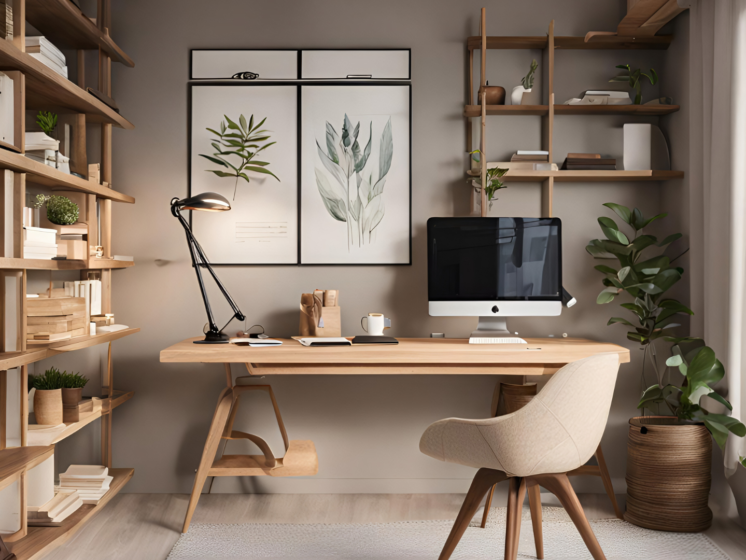
Creating a functional home office means designing a space that supports productivity, comfort, and focus. The key is to prioritize organization, ergonomic furniture, and adequate lighting to make work easier and reduce distractions.
Choosing the right desk and chair is essential for maintaining good posture and preventing fatigue. Adding storage solutions and minimizing clutter helps keep everything within reach and maintains a clear workspace.
Lighting plays a major role; natural light is best, but adjustable artificial lighting can reduce eye strain. With these elements in place, your home office can become a practical and efficient area tailored to your work needs.
Choosing the Right Space
Identify specific work requirements and environmental factors. Focus on space size, natural light, noise, and accessibility to make informed decisions.
Assessing Your Needs
Begin by listing essential equipment and furniture for your home office, such as desks, chairs, monitors, or printers. Consider daily tasks and whether you need space for paperwork, computer work, or meetings.
Evaluate how much room you require. A 5×7-foot area can accommodate a basic setup, while larger spaces support multiple screens or additional storage. Factor in mobility within the workspace to avoid clutter.
Also, assess your work schedule. If frequent client calls are involved, you might require soundproofing or a quieter zone. Understanding your workflow priorities ensures the space supports productivity and comfort.
Selecting a Location
Choose a spot with adequate natural light to reduce eye strain and enhance mood. South- or east-facing windows are ideal for consistent daylight. Avoid areas with disruptive glare on screens.
Consider proximity to household traffic zones. Spaces away from kitchens or living rooms tend to have fewer distractions. A spare bedroom, a basement corner, or a dedicated nook can serve well.
Check for necessary electrical outlets and Wi-Fi strength. These technical needs are crucial for uninterrupted work. If needed, plan for extensions or signal boosters before setting up.
Optimizing Privacy
Privacy helps maintain focus and separates work from personal life. Use room dividers, curtains, or screens to visually block the workspace.
Sound management matters. Thick rugs, curtains, or acoustic panels can dampen noise. Headphones are a practical addition in shared living environments.
Inform other household members of your working hours to minimize interruptions. Clear boundaries promote respect for your workspace and contribute to a professional atmosphere.
Essential Home Office Furniture
Selecting the right furniture impacts comfort, productivity, and organization in a home office. Balancing functionality with personal preferences ensures a space that supports long work hours while maintaining neatness.
Choosing a Desk
A desk’s size and shape should match available space and work habits. Opt for a surface at least 48 inches wide and 24 inches deep to accommodate monitors, a keyboard, and other tools comfortably.
Materials matter. Solid wood desks offer durability, while laminate varieties tend to be lighter and budget-friendly. Consider adjustable-height desks to alternate between sitting and standing, reducing strain.
Cable management features like built-in grommets or trays prevent clutter. Drawer options add convenience but prioritize legroom to maintain an ergonomic posture.
Ergonomic Chair Selection
A chair must support the spine and encourage healthy posture. Look for adjustable seat height (16-21 inches), lumbar support, and a seat depth that fits your thighs without pressure behind the knees.
Mesh backs improve breathability, preventing sweat buildup during extended use. Armrests should be adjustable or removable to allow elbows to rest at a 90-degree angle.
Tilt and recline mechanisms reduce fatigue by allowing slight movement. Prioritize a stable base with five casters for smooth mobility on various floor types.
Storage Solutions
Efficient storage reduces distractions and keeps essentials accessible. Use filing cabinets for documents and small drawers for office supplies like pens, paper, and chargers.
Vertical storage, such as wall-mounted shelves or pegboards, preserves floor space. Label storage bins clearly to speed retrieval.
Consider multi-functional furniture like desks with integrated shelving. Maintain a balance: enough storage to avoid clutter but not so much that the area feels cramped.
Technology and Equipment Setup
Choosing the right devices and ensuring stable connectivity from the backbone of a productive home office. Proper selection and arrangement of these tools will directly affect efficiency and comfort.
Computer and Monitor Selection
Select a computer that matches your workload. For instance, a laptop with at least an Intel i5 or Ryzen 5 processor suits most office tasks. If your work involves graphic design or video editing, prioritize higher specs like an i7/Ryzen 7 or dedicated GPU.
Consider dual monitors for tasks requiring multiple windows open simultaneously. A primary monitor of 24 to 27 inches with 1080p or 1440p resolution balances screen real estate and eye comfort.
Ergonomic positioning is essential. Use adjustable monitor stands to ensure the top of the screen is at or slightly below eye level. This reduces neck strain and supports better posture.
Internet Connectivity
A wired Ethernet connection offers the most stable and fastest internet, critical for conferences or large file transfers. If Ethernet isn’t feasible, choose a 5 GHz Wi-Fi band over 2.4 GHz for less interference and higher speeds.
Aim for a minimum of 50 Mbps download and 10 Mbps upload speeds. This supports video calls and multiple connected devices without lag.
Place your router centrally or close to your workspace. Consider a mesh Wi-Fi system for large or multi-story homes to maintain strong signals everywhere.
Essential Accessories
Start with a quality keyboard and mouse designed for extended use. Mechanical keyboards or those with ergonomic designs help reduce hand fatigue.
Use a comfortable chair with lumbar support and adjustable height. A desk with enough surface area to hold your equipment and leave room for writing or note-taking improves workflow.
Other helpful accessories include a webcam with 1080p resolution, a noise-canceling headset for calls, and a surge protector to safeguard electronics.
| Accessory | Purpose | Recommended Feature |
| Keyboard & Mouse | Input devices | Ergonomic, wireless option |
| Chair | Seating comfort | Lumbar support, adjustable height |
| Webcam | Video calls | 1080p resolution |
| Headset | Clear audio during meetings | Noise-canceling microphone |
| Surge Protector | Device safety | Multiple outlets, surge protection |
Lighting and Ambiance
Proper lighting and ambiance are essential for maintaining focus and reducing eye strain in a home office. Balancing natural light, adding specific task lighting, and choosing decor that supports a productive mood contribute to a functional workspace.
Natural Light Utilization
Position your desk near a window to maximize natural light exposure without causing glare on screens. Use adjustable blinds or curtains to control brightness throughout the day. Natural light improves mood and energy, so aim for at least 3-4 hours of indirect sunlight.
Avoid placing monitors directly opposite windows, which can reflect light and cause eye fatigue. If natural light is limited, consider a daylight-spectrum bulb to mimic natural conditions. Plants near windows can also help soften the light and create a calm environment.
Task Lighting
Task lighting should be adjustable and focused to minimize shadows and reduce eye strain during detailed work. A desk lamp with a flexible arm and adjustable brightness is ideal. Look for bulbs with a color temperature between 4000K and 5000K, which promotes alertness without harshness.
Position lamps to the side of your dominant hand to avoid casting shadows over your workspace. LED lights are energy-efficient and generate less heat. Incorporate multiple light sources that can be combined for different tasks, such as reading or computer work.
Decor and Mood Enhancement
Choose colors and decor that foster concentration and calmness. Soft blues, greens, or neutral tones reduce stress and improve focus. Avoid overly bright or saturated colors that can be distracting.
Incorporate elements like plants, artwork, or textured items to add warmth without clutter. Use light diffusers or lampshades to soften harsh lighting. Declutter regularly to maintain an environment that supports productivity and minimizes visual noise.
Organizing Your Home Office
Efficient use of space and systematic management of materials are essential for a productive workspace. Prioritizing order minimizes distractions and streamlines tasks.
Decluttering Strategies
Begin by removing all items that do not contribute to work tasks or comfort. Sort objects into three groups: keep, donate, and discard. This reduces unnecessary clutter and frees up valuable surface and storage space.
Use labeled bins or shelves to store frequently used supplies within arm’s reach. Items used less often can be placed in drawers or cabinets. Clear containers or open shelving help maintain visibility without creating a mess.
Aim to clear your desk at the end of each day. A clean workspace supports focus and allows for a fresh start the next morning. Digital decluttering should follow the same principles to prevent distraction.
Paper and Digital Organization
Implement a filing system with categorized folders for invoices, correspondence, and project materials. Use color-coded labels or tabs to quickly identify documents. Regularly shred or recycle outdated paperwork to avoid a pileup.
For digital files, establish consistent naming conventions for easy retrieval. Back up important documents with cloud services or external drives. Organize emails with folders and filters to separate priorities from informational messages.
Set a schedule to review both paper and digital files weekly. This helps in maintaining order and preventing accumulation that hampers workflow.
Creating a Productive Environment
A functional home office depends on an environment that supports focus and well-being. This involves controlling external interruptions and enhancing the space with elements that improve air quality and mood.
Minimizing Distractions
Identify common distractions such as noise, clutter, and digital interruptions. Use noise-canceling headphones or white noise devices to reduce ambient sounds. Arrange your desk to face away from windows with heavy foot traffic or noisy streets.
Keep only essential items on your desk to limit visual clutter. Use cable management solutions like clips or sleeves to organize wires. Set specific times to check email and social media to avoid constant digital distractions.
Establish clear boundaries with household members during work hours by posting signs or using a separate room. Use apps that block distracting websites when focused work is essential. Consistency in these habits supports sustained concentration.
Incorporating Greenery
Adding plants helps improve air quality and creates a calming atmosphere. Choose low-maintenance varieties such as snake plants, pothos, or succulents if care time is limited.
Place plants within sight at your desk or nearby shelves to benefit from their visual presence. Avoid overcrowding the space; one or two well-chosen plants are sufficient.
Plants can reduce stress and increase productivity. Consider small herb gardens if natural scents are preferred. Regularly care for the plants to keep the environment inviting and fresh.
Personalizing Your Workspace
Creating a home office that reflects your style and keeps you motivated involves thoughtful additions. Small, meaningful items and carefully chosen art can make the space comfortable and inspiring without cluttering it.
Adding Personal Touches
Incorporate items that have personal significance to enhance comfort and focus. This could include family photos in simple frames, a favorite mug, or a small plant like a succulent, which requires little care but adds greenery.
Use organizational tools like customized desk organizers or a bulletin board with important reminders and motivational quotes. These personal touches can increase productivity by creating a sense of ownership and belonging.
Avoid overcrowding your desk. Select a few meaningful items that bring joy or calmness to your workspace while maintaining enough clear area for tasks.
Inspiring Wall Art
Choose wall art that encourages productivity and positivity. Prints with simple typography featuring motivational phrases or calming imagery like landscapes can help maintain focus during long work sessions.
Consider rotating pieces seasonally to keep the environment fresh and engaging. Use frames with clean lines and neutral colors to avoid being distracted from your work.
Avoid large, overly bright, or busy artwork that can overwhelm the senses. Instead, opt for pieces that balance inspiration with subtlety to complement your workspace’s design.
Establishing a Work-Life Balance
Creating a clear boundary between work and personal time is essential for a functional home office. Without physical separation, tasks can easily overlap, causing stress and reduced productivity.
Set specific working hours and stick to them consistently. Use reminders or alarms to signal the end of your workday, helping you disconnect.
Designate a dedicated workspace separate from relaxation areas. This helps mentally switch between work mode and personal time.
Incorporate regular breaks to prevent burnout. Even short walks or stretches every hour improve focus and well-being.
| Tips for Work-Life Balance | Description |
| Define work hours | Establish clear start and end times |
| Separate workspace | Avoid working from beds or couches |
| Use technology controls | Mute work notifications outside work hours |
| Prioritize tasks | Focus on urgent tasks to reduce overtime |
Avoid multitasking with personal activities during work hours. This can reduce overall efficiency and increase stress.
Communicate your boundaries to others in your household. This helps minimize interruptions and supports a professional atmosphere.
Maintaining and Upgrading Your Home Office
Regular maintenance keeps your home office functional and comfortable. Clean your workspace weekly to remove dust and clutter. Check cables and equipment for wear and replace them as needed to avoid interruptions.
Update your software and hardware periodically. This ensures compatibility with new tools and helps maintain security. A good rule is to review your setup every six months.
Consider ergonomic upgrades to improve comfort and reduce strain. Adjustable chairs, monitor stands, and keyboard trays can make a significant difference.
Use this table as a quick reference for common upgrades:
| Upgrade Component | Purpose | Suggested Frequency |
| Ergonomic Chair | Enhance posture and comfort | Every 2-3 years |
| Monitor | Improve display quality | Every 3-4 years |
| Keyboard/Mouse | Increase ease of use | Every 2-3 years |
| Software | Security and efficiency | Every 6 months |
| Cable Management | Prevent damage and clutter | Monthly |
Incorporate small changes to adapt to evolving work needs. Adding additional lighting or soundproofing can boost productivity.
Tracking the lifespan of each item helps plan the budget and replacements efficiently. Keep receipts and notes on purchase dates for easier management.
